
Interactive teaching in a secondary school works when a student can start it in seconds and has nothing to register. They scan a QR code in the textbook, an exercise or a 3D model opens in the browser, and they can begin. For the whole class, the teacher opens a live lesson with a room code, students join under a nickname and see the results straight away. Where it tends to break is school wifi, phone rules and mixed devices, which the last part covers. I write as a developer, not a teacher: I build the i-EDUKO digital layer for textbooks and educational games, so this is the view from my side of the desk, not a log of lessons.
How do you bring interactive teaching into a secondary school without student accounts? Three steps. Content opens through a QR code in the textbook, with no installation and no registration. Practice has instant checking built into the exercise. A live lesson ties the class together: the teacher opens a room, students enter a six-character code and a nickname. No accounts means no time lost on passwords and one less personal-data worry, but what a school may process is still the school's decision.
Why no student accounts?
There are two reasons, and both are down to earth.
The first is time. A lesson is short. If twenty students first have to invent a password, confirm an email and lose their login, the exercise does not happen. The teacher tries it once and does not reach for it again. That goes double for vocational subjects, where the interactive part has to fit between the explanation and the work with the text.
The second is personal data. Section 7 of the Czech Act No. 110/2019 Coll. (Czech text) provides that a child acquires the capacity to consent to the processing of personal data in connection with an offer of information society services made directly to them on completing the age of fifteen. The wording in force on 24 October 2026 and the wording in effect from 1 November 2026 are the same in this section. In a secondary school a class can include students below that age and above it, and signing up for an online service would raise the question of who may consent to what.
If no accounts are created at all, that question does not come up for the exercise itself. Do not read this as "nothing is processed", though: ordinary website operation always handles some technical data, and what is acceptable is something to settle with whoever handles data protection at your school. I am not a lawyer, and a pointer to a section is not legal advice.
How does a student get from the textbook to an exercise?
With i-EDUKO, the starting point is the textbook. A student has a chapter in front of them, scans the QR code and, according to the i-EDUKO site (Czech), the content opens straight in the browser, with no installation and no registration. It can be an interactive exercise, a rotating 3D model, an animation, a video or a quiz. The content is not freely downloadable: access is controlled by a short session issued when the QR code is scanned, not by a permanent link. The site states that everything runs in an ordinary browser on a phone, tablet or interactive whiteboard.
For the teacher, one thing matters: preparing the lesson is "open the chapter and scan the code". No list of links by email, no shared folders. How such a layer is built and what to settle when commissioning one is in my guide for publishers. Here I stay with the lesson.
How does a live lesson with a room code work?
A standalone exercise suits homework or quick practice. But a teacher often wants the whole class to do the same thing at the same time. That is what the live class is for (the site describes it as an optional mode, since not every piece of content is used as a class activity):
- the teacher opens a room with a six-character code,
- students join with that code and pick a nickname,
- the teacher sees results live: points, percentages and ranking,
- on top of that come motivational elements: points, cups and badges.
A nickname helps in secondary school in a simple way: no student name hangs in the results. I also expect it to soften the embarrassment of a mistake in front of classmates, but that is my assumption, not a measurement. A short agreement at the start about which nicknames are fine saves the teacher some awkward moments.
A ranking cuts both ways: motivation for some, stress for others. What research says about points and leaderboards is in my article on gamification in teaching.
Which way to run it is summed up in the table:
| Approach | What the student needs | When it fits | Watch out for |
|---|---|---|---|
Standalone exercise via QR |
a device with a browser and the textbook |
homework, quick practice |
connection when opening, screen size |
Live lesson |
a six-character code and a nickname |
the whole class does the same thing at once |
load on the wifi, nickname rules, the leaderboard |
Projecting from one device |
nothing |
weak wifi or a phone ban |
students do not work on their own |
What does an exercise with instant checking look like?
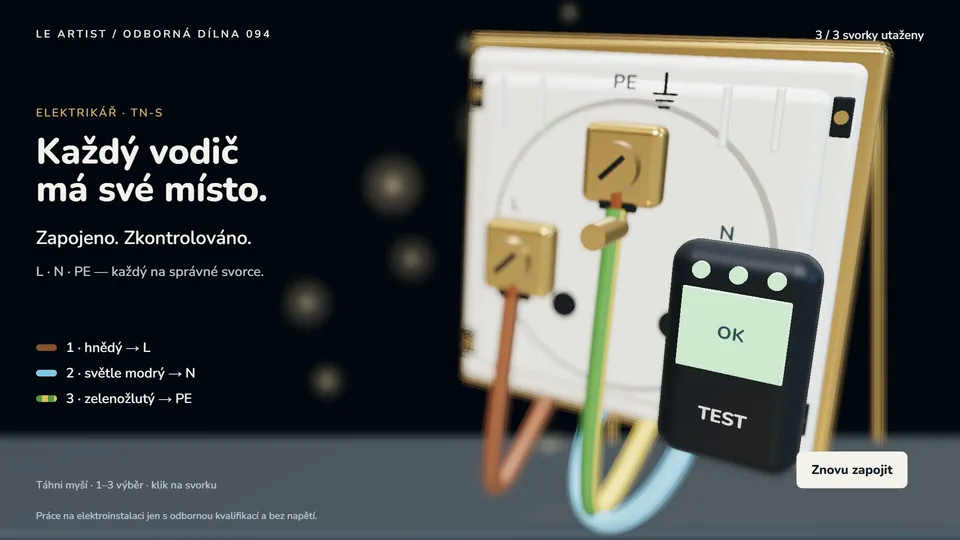
The simplest form of interactivity is an exercise that tells the student straight away whether the answer was right, and why not. In vocational subjects that matters even more, because the mistake is often not a gap in knowledge but in procedure: a wrongly wired conductor or a wrongly chosen order of wheel bolts.
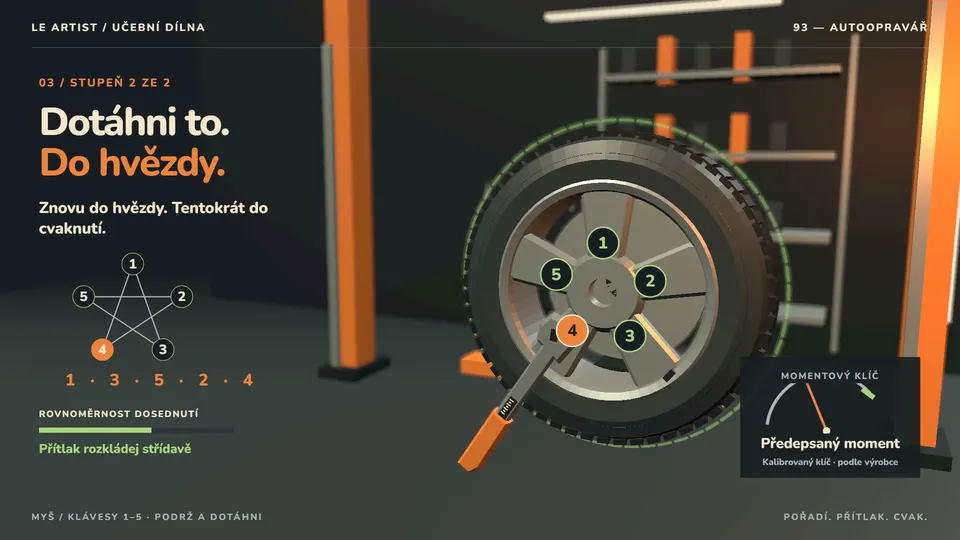
My two demos show what such an exercise can look like. Both are my game demos for secondary school and are part of the approved games overview. Neither was made in a classroom with students, and the field for each is a suggestion based on difficulty, not a check in practice. The professional rule each game rests on is in the table, with its source:
| Game | What the student does | Professional basis |
|---|---|---|
| Wiring a socket (suggested for: electrician, desktop) | Connects the L, N and PE wires to the right terminals. Swapped wires make the tester show an error, after the fix it lights up OK. | L is the line (phase) conductor, N the neutral and PE the protective conductor (explanation of the marking, Czech). Marking conductors with letters and colours is covered by IEC 60445. |
| Wheel bolts (suggested for: car mechanic, desktop) | Tightens five wheel bolts in a star pattern. Going round the rim tilts the wheel, the star pattern lets it run true again. | Bolts are tightened in a criss-cross (star) pattern so the wheel seats evenly, then with a torque wrench to the value from the vehicle manufacturer (Brembo, Czech). |
One of these deserves a closer look, because that is where the student actually learns.
Wheel bolts. With five bolts, the star order used in practice is for example 1, 4, 2, 5, 3, first lightly and then fully (Autojournal, Czech). The brake disc maker DBA says in its technical bulletin that failing to tighten in the criss-cross sequence will cause misalignment of the wheel. The exact torque for a particular car is in the vehicle manufacturer's manual.
Both are in the overview of educational games and run in the browser with no installation. What a teacher should take from them is the principle: checking inside the situation, not after it. How such a set of exercises is made and how much work it takes is described under interactive exercises.
What are 3D models and animations good for in chemistry and biology?
Some things you cannot show on paper. In i-EDUKO, rotating 3D models and animations are one of the content types. In chemistry, rotation helps where the spatial arrangement matters, for example in molecules and orbitals, and animations show processes that a picture can only hint at, such as filtration or sedimentation. In biology, it helps with structures that a picture draws from one angle and the student has to imagine the rest. That is my opinion from development, not a measured effect.
As of 24 October 2026, the i-eduko.cz site has 104 items in chemistry and 4 in biology. Biology is so far the smaller part of the offer. So if you are looking for a large pack for biology, check the current state on the site itself, not in this article.
A 3D model is also the heaviest content type for a device. An older phone may render it more slowly than a school computer, and a large model loads for a long time over a weak connection. Open it on the devices your students really have before the lesson.
What is i-EDUKO?
i-EDUKO is the digital layer for the printed textbooks of EDUKO nakladatelství. The operator is EDUKO nakladatelství, s.r.o., and the site is signed "Tvoří Le Artist" ("Made by Le Artist"), which is me. It targets secondary vocational schools. As of 24 October 2026, the site lists economics (16 items), chemistry (104), biology (4) and communication (23); law is in preparation. The content types are interactive exercises, rotating 3D models, animations, videos and quizzes.
If you teach from other textbooks, it is mainly an example of what an interactive layer can look like. If you want something similar for your subject or school, write to me, or see the i-EDUKO case study and the About page.
What can go wrong in an interactive lesson?
This needs honesty, because it decides more than the quality of the exercise.
Wifi. A class that opens the same page on twenty devices at once loads the school network. I do not know how yours copes, and I have not tried it in a class of thirty phones. Check it with your IT teacher or network admin before the first use: one trial with half the class is enough.
Phones in lessons. Some schools ban them, others allow them. If your school does not allow phones in lessons, an interactive lesson is a question for the school's rules, not only for technology. The alternative for one lesson is simple: the teacher projects the exercise from a single device, perhaps on an interactive whiteboard, and the class decides together.
Devices and screen size. Both demos (Wiring a socket, Wheel bolts) are designed for a computer in landscape. That is not a detail: a game made for a big screen plays badly on a phone. Try what students actually hold in their hands before the lesson, and consider projecting the game.
Not every topic fits. An interactive exercise does not replace an explanation. If a student does not understand the principle, they will not practise it. And at the usual pace of a lesson there is no time for everything: one good exercise beats five.
- Try it yourself first, on the device your students have.
- Test the connection with half the class, not with one phone.
- Have a plan B: projecting from one device and deciding together.
- Agree on rules for nicknames.
- Follow the exercise with a short review of mistakes, not just a leaderboard.
- Check with your school what may be processed.
Frequently Asked Questions
Do students need an account for interactive teaching?
Not with i-EDUKO. A student scans the QR code in the textbook and the content opens in the browser with no installation and no registration. In a live class they join with a room code and a nickname.
At what age can a student consent to the processing of personal data on their own?
Under section 7 of Czech Act No. 110/2019 Coll. (Czech text), a child acquires the capacity to consent to the processing of personal data in connection with an offer of information society services made directly to them on completing the age of fifteen. The wording in force on 24 October 2026 and the wording in effect from 1 November 2026 are the same in this section. This is a pointer to the statute, not legal advice: a specific case is for the school to settle with whoever handles data protection there.
What if the school has poor wifi or does not allow phones?
Then the simplest option is one device: the teacher projects the exercise and the class answers together. It works with no student connections, no phones on desks and no load on the network. You lose each student's individual work, but you keep instant feedback and a discussion of the mistakes.
Can an exercise be made to order for my subject?
Yes. I do it under interactive exercises, and a custom game under educational games on commission. I check the facts in the games against a source. You can see examples in the games overview.