
A digital companion to a printed textbook is a web layer a student enters by scanning a QR code in a chapter: an exercise, a 3D model, an animation or a video opens next to the page they are reading. A well-built companion works without installing anything and without a student account, the content is not freely available on the internet, and the publisher can change it after the book has gone to print. I build exactly this kind of system for EDUKO nakladatelství, s.r.o., a Czech textbook publisher. The platform is called i-EDUKO. In this article I describe how it works and what to watch for if you are planning something similar.
How do you build a digital companion for a textbook? The QR code in the book must not point to a file. It should point to a short address in a registry that you can redirect later. After the scan the student gets a short session without registration, and the content opens only through it. Exercises, 3D models and videos run in the browser. A teacher can run the same content for the whole class as a live lesson with a room code. The deciding factor is not the technology but who will manage the content after publication, and how.
What can a QR code in a textbook open?
On i-EDUKO, a QR code from the textbook opens interactive exercises, rotatable 3D models, animations and videos (i-eduko.cz). As of 24 October 2026 the site lists economics (16 items), chemistry (104), biology (4) and communication (23), with law in preparation. The public site is a showcase and explanation; the full content opens through QR or school access (Digital textbooks). It is a companion to a printed series for secondary vocational schools, not a standalone course or a shop.
From my experience, the hardest part is not the technology but deciding what belongs in the digital layer. Three kinds of content work well:
- Things paper cannot show: a 3D molecule you can rotate, an animation of a process, a simulated lab experiment.
- Practice with instant feedback: the student knows right away whether the answer was correct, and why not.
- Short videos for a difficult part of a chapter, not a recorded lecture for a whole lesson.
What does not belong there: a PDF identical to the page in the book, and content nobody is going to maintain.
How do you open content without a student account, yet not publicly?
A student opens the textbook in class and is supposed to scan a code. If a registration, a password or an app installation is waiting for them at that moment, half the lesson is gone and the teacher will not try it again. That is why i-EDUKO works without installation and without registration: the content opens in the browser of a phone, tablet or interactive whiteboard (i-EDUKO FAQ).
At the same time, a publisher does not want content it paid for to spread as a public link. This is how i-EDUKO handles it:
- The QR code points to a registry, not to a file. The printed code is separate from the specific content behind it, so the target can change later (QR codes in textbooks).
- A scan issues a short session. Access is controlled by a short session started by the scanned code, not by a permanent link (how it works). The session cookie lasts up to 4 hours, is signed and is not accessible to page scripts (privacy policy). The session allows only the content the student reached through the code, and without it the content does not open, even through a direct link.
- Executable content runs in isolation. Older Storyline packages are shown in i-EDUKO inside an iframe with a sandbox that does not include
allow-same-origin. According to the MDN documentation, such content is treated as coming from a special origin that always fails the same-origin policy, which can keep it away from cookies and storage.
No content protection on the web is bulletproof: this is not DRM, and the goal is to limit bulk downloading, not to stop someone from screen-recording on a phone. The point is that the content cannot easily be shared as a public address.
Even without registration, technical data is processed. According to its privacy policy, i-EDUKO stores an IP address only as a one-way hash, uses only strictly necessary cookies, and a student in the live class enters a name, for which the policy recommends a nickname; names and nicknames are anonymized 30 days after the class ends. If a companion wanted student accounts or names, consent comes into play: Czech Act No. 110/2019 Coll., section 7 gives a child the capacity to consent to the processing of personal data in relation to information society services from the age of 15 (section 7 reads the same in the current version and in the version effective from 1 November 2026). That is the Czech rule: if you publish for other markets, ask which age applies there. How to handle younger students is a question for the publisher's data protection officer, not for the developer.
What if the QR code is printed and the content changes?
This is the most important decision in the whole project and the most common mistake. A book is printed to last for years, but web content changes: an error in an exercise is fixed, a new version appears, hosting changes.
Older printed series from EDUKO had QR codes pointing directly to addresses that mirrored the folders and files of the old website. A new platform therefore has to take over those old addresses and map them to the new content, so that the codes in books already in schools keep working. As a result, an error in the digital content can be fixed without touching the already printed book (QR codes in textbooks). The difference between the two approaches looks like this:
| QR straight to a file | QR through a registry | |
|---|---|---|
| What is in the code | the address of one specific file | a short address that the registry resolves to content |
| Fixing an error after printing | a new address means a reprint or redirecting the old addresses | change the target in the registry |
| Content is not ready yet | a dead link | a page with information or a preview |
| Content available only for a period | not possible | validity from and to |
| Overview of which code goes where | nowhere | an export of the registry |
On i-EDUKO every QR link in the registry has a status (active, coming soon, disabled), an optional validity from and to, and a target that can be changed without reprinting. The "coming soon" status means the code is already printed and the content is not ready yet, so the student does not hit a dead link.
If you are planning a new series, get three things confirmed by your supplier: the codes point to your domain, not the supplier's; you control the redirects; and a registry export exists (which QR goes where), in case you ever change suppliers.
How does a live class work?
A student works through a single exercise alone. A teacher, though, often wants the whole class at once. On i-EDUKO this is an optional mode: the teacher creates a room with a six-character code, students join under a nickname, and the teacher sees results live: points, percentages and ranking (FAQ). The site also shows levels (for example "Level 7 · Ekonom") and badges (for example "První cvičení", the first exercise, or "5 dní v řadě", five days in a row).
Two notes from development, both my opinion rather than measurement:
- Ranking motivates only part of the class. Badges for days in a row and for the first exercise help those who will never be first. For what research says about points and leaderboards, see my article on gamification in teaching.
- A teacher has to see who is stuck, not only who is winning. The teacher's overview matters as much as the student's screen.
Which games and simulations fit a companion?
A companion does not have to be only exercises. My overview of educational games contains demos that would fit into the digital layer of a textbook for secondary schools:
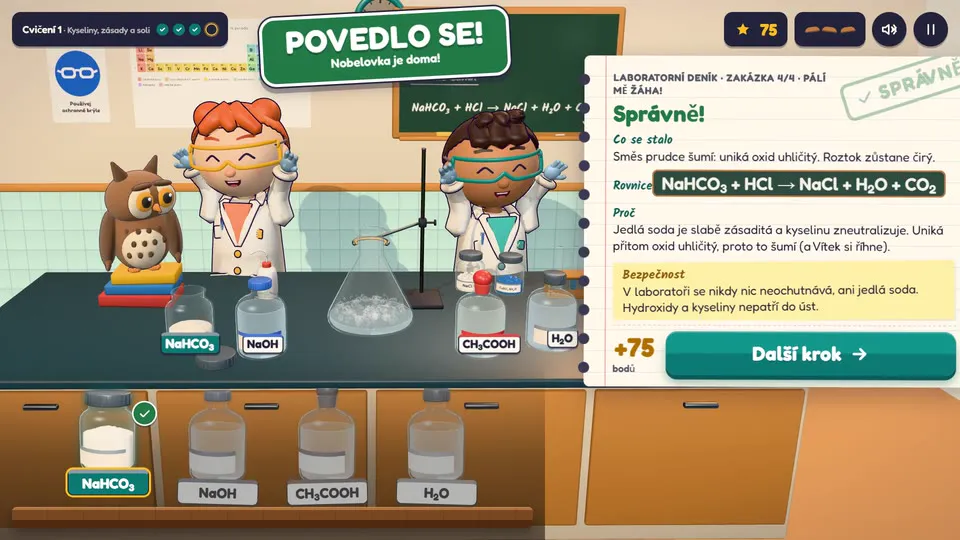
- Eduko: Lab. A virtual chemistry lab: the task "My heartburn hurts", the student adds baking soda to the acid flask and the experiment runs right on the table. A lab experiment that would be hard to do in a classroom.
- Titration. A lab technician adds alkali to an acid drop by drop and watches the pH, which is calculated in code. An overshot drop means a new attempt. A burette experiment the student can repeat as many times as needed.
- Eduko: Accounting Office. A 3D accounting desk where the desk itself is the controls: a paper from the pile goes into a binder, account cards are picked in the binder and a stamp confirms it. A flyer ends up in the bin while the character and the owl react. It is in the overview for its visuals and controls.
For a school game it matters that the subject matter under it is real, not scenery. The story, characters and style may be invented, the subject matter may not. Here is the factual basis these three demos relate to:
| Game | Subject matter under the game | Source |
|---|---|---|
| Eduko: Lab | Baking soda (sodium bicarbonate) is an antacid, a substance used against heartburn. The main component of gastric acid is hydrochloric acid, and sodium bicarbonate reacts with it to produce sodium chloride, carbon dioxide and water. | MedlinePlus, StatPearls: Physiology, Stomach, Antacids revisited, J Int Med Res 2022 |
| Titration | When a strong acid is titrated with a strong base, only a salt remains in solution at the equivalence point and the pH is 7.00. Near the equivalence point the pH rises most steeply. The game titrates 10 ml of acid at 0.1 mol/l with alkali of the same concentration: at 10.00 ml the pH is 7.00, at 10.10 ml it is already 10.70. | Brown et al.: Chemistry, The Central Science, ch. 17.3 Acid-Base Titrations; the pH values are computed by the game code and checked by a test |
| Eduko: Accounting Office | A demo of visuals and controls. It does not show specific accounting rules, so I make no claims about them here. | no subject-matter claim |
On the games page they appear as recordings of the demos. How the games were made, including the role of AI, is described on the games page. I design a game tailored to your chapter as part of the custom educational game development service, and sets of exercises as part of my interactive exercises service.
What about old content from authoring tools?
A publisher rarely starts from zero. EDUKO had exercises built in Articulate Storyline. I write the new exercises in i-EDUKO in React, and the platform still plays the older Storyline content in an embedded frame. A student opens both the same way, by scanning a QR code. When an authoring tool makes sense and when content built in code does, I cover in How much does e-learning cost.
The practical advice for a publisher: do not let anyone force you into migrating everything at once. Convert content by what is used most and what is corrected most often.
What does it cost to run after launch?
Specific amounts depend on the volume of content and traffic, so I will not estimate them here. You always pay for the same items, though:
- storage and transfer of media (videos and 3D models are the largest),
- a database for the QR registry, sessions and live class results,
- maintenance: library updates, security fixes, checking that old QR codes still lead to content,
- content management: someone has to fix an error in an exercise when a teacher reports it.
The last item is the most underestimated. A budget for creation without a budget for management means that a year later the companion is full of dead links.
What should you check before commissioning a digital companion?
- QR codes point to your domain and go through a registry, not straight to files.
- A student reaches the content without installation and without an account.
- The content is not available through a public direct link.
- You know who fixes the content after publication and within what time.
- Old content from authoring tools can be carried over and does not have to be rewritten at once.
- The supplier hands over an export of the QR registry and the source files.
- Your data protection officer has seen which data is processed.
- The facts in the exercises are checked by the author or a subject editor, not by the programmer.
Frequently Asked Questions
Does a student need an account for a digital textbook?
No. On i-EDUKO a student scans a QR code and the content opens in the browser without registration (i-EDUKO FAQ). Access is guarded by a short session issued by the scan itself. A content manager needs an account.
What if the content changes after the textbook is printed?
The QR code should point to a short address in a registry, not to a file. The target in the registry can be changed at any time, so a corrected exercise or a new version does not need a reprint. Codes that point straight to a file can only be rescued by redirecting the old addresses, which is extra work.
Can we reuse content we already have in Articulate Storyline?
Yes. i-EDUKO plays older Storyline content in an embedded frame next to the new exercises in React. The conversion can be done gradually.
Who built i-EDUKO?
i-EDUKO for EDUKO nakladatelství, s.r.o. is built by Le Artist, which means me, Marek Frňka. The i-eduko.cz footer says so. Project details are in the i-EDUKO case study, and more about me is on the About page.